
It’s noon on a packed Friday, and your café’s card readers blink offline. Lattes pile up, the line grows edgy, and every stalled swipe hurts your tip jar. Columbus no longer suffers that fate: national giants, fresh fiber builds, and regional workhorse WOW! Business now compete block by block.
We compared the five most available business ISPs on uptime, speed, value, support, and flexibility – so in the next ten minutes you’ll know which one keeps the lattes flowing without a regret-filled contract.
How we chose the “best”

We didn’t toss darts at a board. We interviewed Columbus owners, sifted local Reddit threads, pulled FCC coverage data, and graded each provider against five business-critical factors.
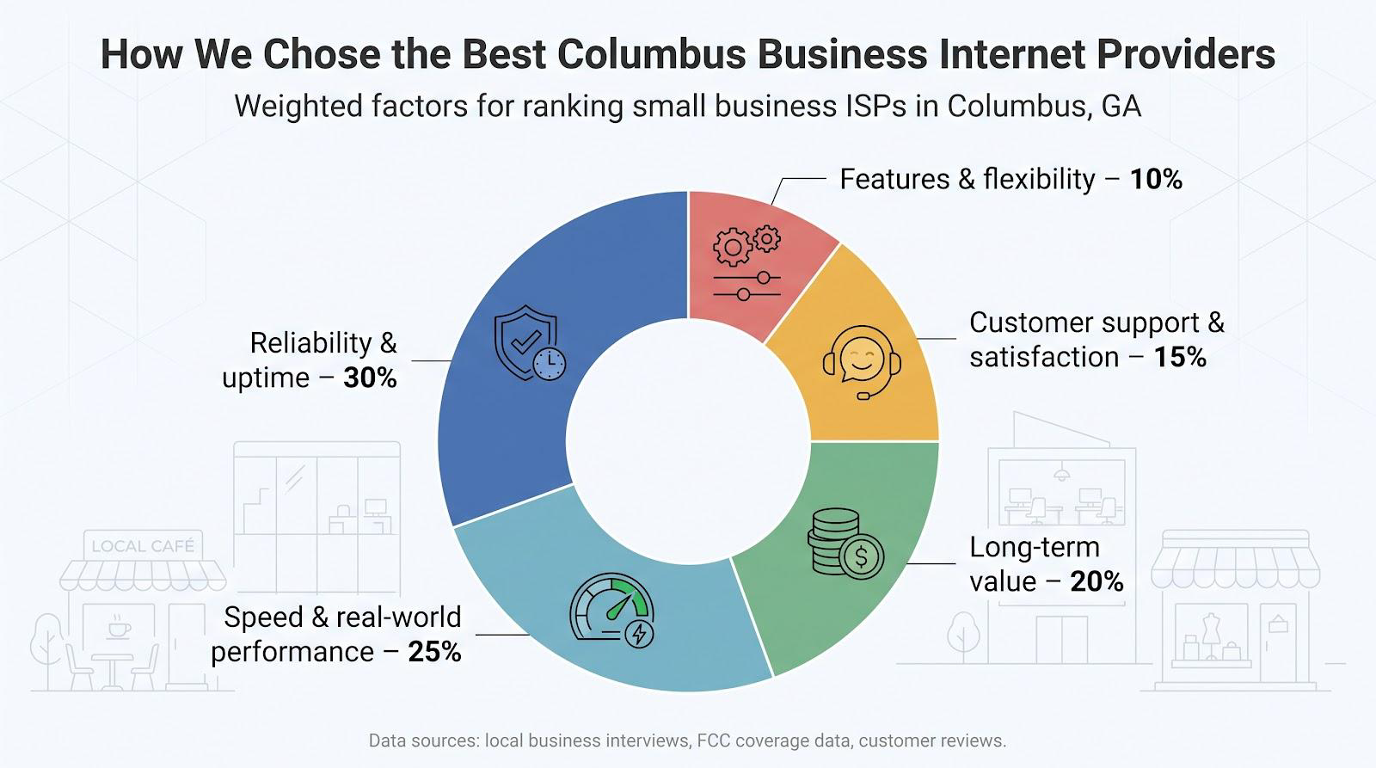
| Factor | Weight | Why it matters |
| Reliability & uptime | 30% | Lost connectivity equals lost revenue. |
| Speed & real-world performance | 25% | Cloud apps and HD video can’t lag. |
| Long-term value | 20% | Promo prices fade; bills remain. |
| Customer support & satisfaction | 15% | Fast resolutions keep doors open. |
| Features & flexibility | 10% | Static IPs, 5G fail-over, no-contract freedom. |
Whenever possible, we leaned on hard proof. The latest J.D. Power study crowned AT&T top performer in two business segments, showing how solid service and clear communication create happier customers.
Numbers alone don’t tell the full story, so we mixed in firsthand accounts: midnight “anyone else down?” posts that expose patterns no sales sheet shows. Each provider’s final score blends data with daily reality, giving you a clear ranking.
1. WOW! Business: best overall value
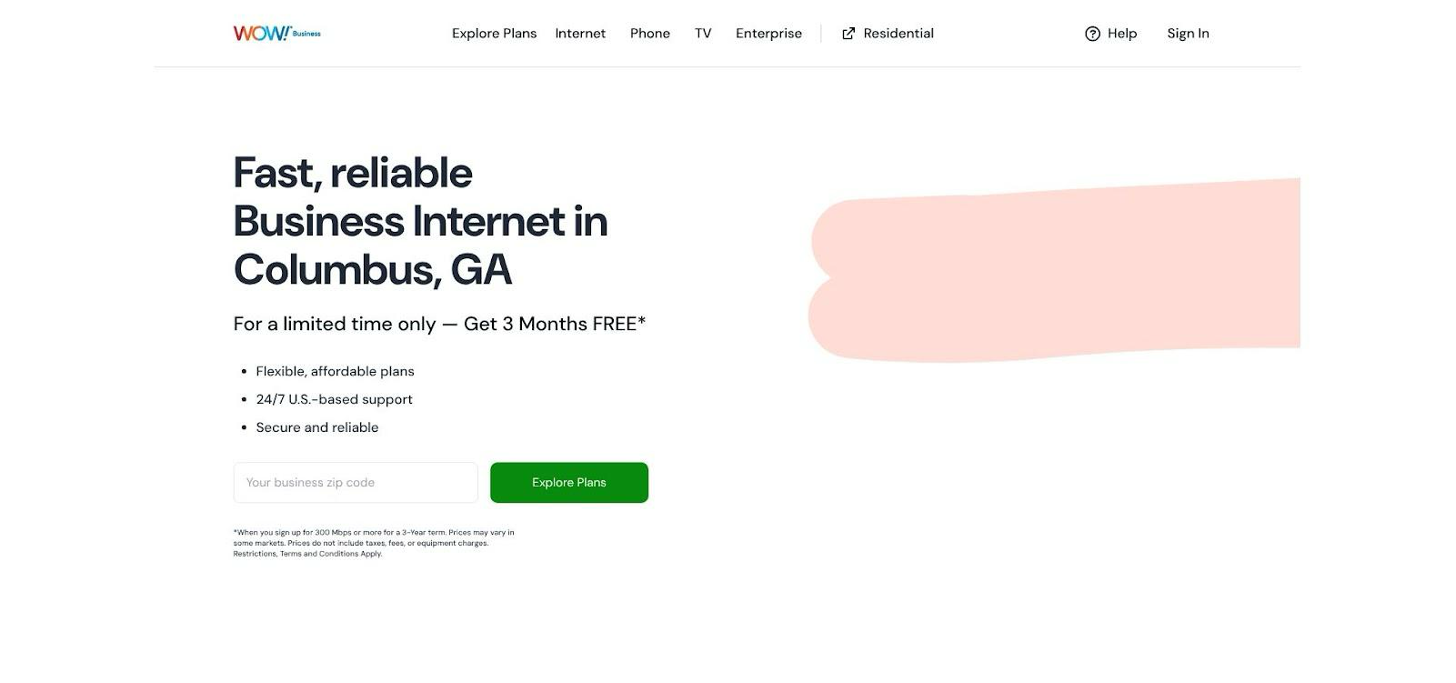
WOW! Business Columbus GA internet plans official page screenshot.
Locals praise WOW! for 99 percent network reliability and a price-lock guarantee, benefits confirmed by Columbus, GA business internet provider WOW! Business. If squeezing every megabit from every dollar is your goal, the company stands out.
According to coverage analysis site Allconnect, the regional cable provider reaches roughly ninety-five percent of Columbus addresses, so the line is likely already in your wall. That reach keeps install times short and lets WOW offer some of the market’s friendliest promo prices, often about sixty-six dollars for 600 Mbps; its 1.2 Gig plan usually lands just above one hundred.
Speed on paper looks stellar. Real-world tests from local owners show the full 600 Mbps down with uploads near fifty. That asymmetry is the trade-off you accept with cable, yet it still handles Zoom calls, point-of-sale traffic, and daily cloud sync with room to spare. Latency stays in the teens, so credit-card swipes clear fast and video chats feel natural.
Reliability has been WOW’s growing pain. Early-2020s network upgrades caused weekly hiccups and late-night resets. The overhaul is finished now, and most neighborhoods report smooth sailing, though pockets served by older coax can still stutter. Many owners keep an inexpensive wireless hotspot in a drawer as insurance.
Customer service feels human. You’ll likely speak with someone in the Southeast, not overseas. Field techs earn praise for same-day fixes; phone agents get mixed reviews, especially on billing tweaks. Mark your contract anniversary: prices rise five to ten dollars after the promo, but a polite “I’m shopping Spectrum” call often wins an instant discount extension.
Bottom line: for cafes, boutique retailers, and startups watching cash flow, WOW delivers gig-level download speed, unlimited data, and small-town attentiveness at a price rivals struggle to match. Pair it with a wireless failover and you have a cost-effective, high-speed foundation that keeps customers and card readers happy.
2. Spectrum Business: most reliable cable choice

Spectrum Business internet plans for small businesses screenshot.
Spectrum wins customers with two perks: stability and freedom.
Most cable outages in Columbus spark Reddit rants about anyone but Spectrum. Business users describe multiyear stretches without an unexpected drop. That steadiness comes from a well-funded coax network and a simple promise: no data caps, no annual contract. You can walk away next month if service slips, yet few owners do.
Pricing sits in the middle. Expect about sixty-five dollars for 300 Mbps and a little over one hundred for the gig tier. You pay slightly more than WOW, but you avoid early-termination fees and mid-contract price hikes. Many shops earn back the difference the first time Spectrum’s faster support crew restores a line before lunch.
Spectrum’s new Invincible WiFi router is the ace. The unit pairs WiFi 7 speed with built-in 5G cellular and an eight-hour battery. If a backhoe cuts the street cable or a power blink hits, the box shifts to wireless in seconds and keeps every tablet and card reader online. Charter launched the device in February 2026 for home and business users, calling it “constant connectivity” in its press release.
Uploads are the one gripe. Even on the gig tier you top out near thirty-five Mbps up, so large nightly backups crawl compared with fiber. For most offices running POS traffic, cloud docs, and Zoom, those uploads are still enough, and Spectrum signals that symmetrical upgrades will follow once its mid-split project reaches Georgia.
Add 24/7 U.S. support, a contract-buyout offer up to one thousand dollars, and painless speed bumps when you grow, and Spectrum Business becomes the safest cable choice in town. Pick it when uptime guarantees and flexible terms matter more than shaving a few dollars from the bill.
3. AT&T Business Fiber: gold-standard performance (where available)
Imagine every photo, backup, or payroll file leaving your office at the same speed it arrives. That is life on AT&T Business Fiber. Symmetrical 300 Mbps, 1 Gig, and even 5 Gig tiers mean uploads happen in real time and video meetings glide without a glitch.
Owners on AT&T fiber streets rave about perfection. One Columbus software studio swapped cable for a 1 Gig drop and logged zero unplanned outages in twelve months. Latency stays around five milliseconds, so cloud apps feel as quick as local drives. Because fiber is not a shared neighborhood pipe, rush-hour slowdowns never appear.
Pricing has edged downward as competition grows. Recent quotes list 300 Mbps near ninety dollars and a full gig around one forty, contract optional. Pair a business wireless line and AT&T knocks thirty to fifty dollars off the bill, shrinking the gap with cable while keeping symmetric upload.
Support matches the premium feel. AT&T topped the latest J.D. Power business internet study, a nod to quick dispatches and proactive outage texts. The service comes with an uptime pledge: you receive bill credit if availability dips below 99.9. Most customers never need to cash it in.
Caveat: coverage. Fiber expands block by block, yet some corridors still have only aging DSL. Always punch your address into the checker before budgeting. If fiber is live, the choice is easy. If not, consider Spectrum until construction reaches your street.
For agencies, architects, or any shop pushing multi-gig files to the cloud, AT&T Business Fiber delivers the rock-solid backbone you expect from a telecom giant, with pricing that finally feels small-business friendly.
4. T-Mobile Business Internet: best budget or backup play
Plug it in, point it at a window, and you are online in 10 minutes. That simple setup is the headline for T-Mobile’s fixed-wireless plan.
For a flat 70 dollars (50 with an eligible phone line), the carrier supplies a Wi-Fi 6 gateway, unlimited data, and a five-year price guarantee. No installation fee, no modem rental, no contract. If you are opening a pop-up store, launching from a spare bedroom, or just need a safety net for cable outages, that simplicity saves time and cash.
Performance is “good enough” for most daily workloads. In strong mid-band 5G zones around Columbus, owners report 100–200 Mbps down and 10–30 Mbps up. Latency sits near 30 ms, so cloud dashboards and HD video behave, though you might notice brief dips when the tower gets busy. It is wireless, after all, and occasional wobbles come with the territory.
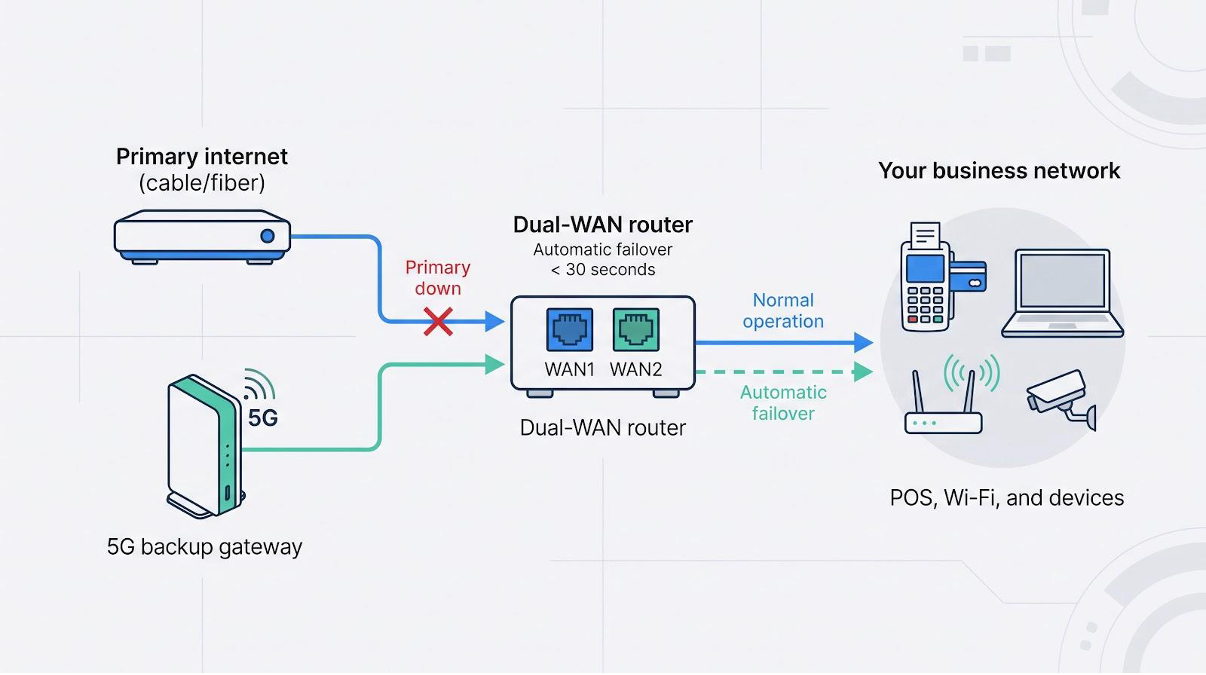
Reliability falls between fiber and a phone hotspot. Weather, building materials, or tower work can ding speeds without warning. There is no service-level agreement, and support cannot fine-tune the network like a wired ISP could. Many businesses therefore treat T-Mobile as a secondary line: wired primary, 5G backup plugged into a dual-WAN router. Total monthly cost stays under 100, yet you gain near-bulletproof uptime.
Networking quirks deserve a quick note. The gateway sits behind carrier-grade NAT, so hosting servers or cameras that need inbound connections is tricky. Static IPs are not standard. For routine outbound tasks such as card swipes, web browsing, or cloud storage, it is a non-issue.
Verdict: choose T-Mobile when fast setup, low cost, or backup peace of mind outrank perfect consistency. It keeps card readers humming during an outage and lets young startups delay bigger broadband bills until revenue catches up.
5. Mediacom Business: last resort for fringe addresses
Mediacom earns a spot because some outskirts of Columbus have little else. If your storefront sits beyond WOW’s 95 percent footprint and outside Spectrum’s plant, Mediacom’s coax may be the only wire in the ground.
On paper its plans impress: up to 1-gigabit downloads, optional static IPs, and bundles that add TV for lobby screens. In neighborhoods with fresh infrastructure, the service meets its advertised speed.
Reality varies. Owners on older nodes share the same story: weeks of buffering, ticket after ticket, and a support script that swaps modems instead of fixing the root cause. Outages last longer than with any competitor, and price hikes after the first-year promo feel steep.
Data caps add another wrinkle. Reps call business tiers “unlimited,” yet fine print mentions acceptable-use thresholds and overage fees. Get that in writing before you sign or your budget could take a hit.
Contracts are standard and early-exit fees firm. A café that later gains AT&T fiber access could pay hundreds just to switch. If you sign, negotiate the shortest term possible and plan a cellular backup from day one.
Mediacom is not hopeless. Many rural offices run smoothly for years. Just approach it clear-eyed, document every promise, and keep an alternate path to the cloud.
Business vs. residential internet: do you need the business tier?
A low-priced home-internet promo may look tempting. The speed tiers often match the business menu, and the modem blinks the same.
Look again.
Residential service offers no guarantees. If the line drops during Saturday brunch, the provider fixes it when they can. Business plans move you to the front of the repair queue and often include uptime credits. That priority alone can justify the modest price bump.
Support differs, too. Call centers route commercial accounts to specialists who understand static IPs, point-of-sale firewalls, and remote-work VPNs. A residential script reader is unlikely to diagnose a card-terminal timeout.
Legality matters. Residential terms cover personal use. Running public Wi-Fi, streaming security cameras, or hosting a web server can violate the agreement and risk shutoff. Business contracts welcome those workloads and bundle a static IP option.
If internet downtime equals lost revenue, choose the business tier. Treat residential service as a starter kit or a backup line, not the backbone of your customer experience.
How much bandwidth does your business need?
Start with a headcount, not a speed number. Picture every device in your space at peak hour: laptops, tablets, phones, cameras, even the espresso machine that phones home for filter updates. Each one sips bandwidth, and those sips add up fast.
A solo consultant working with email and cloud docs feels fine on 50 Mbps. Add four employees running simultaneous video calls and shared drives, and the pipe should grow toward 300 Mbps. Add guest Wi-Fi for customers, and 500 Mbps looks prudent.
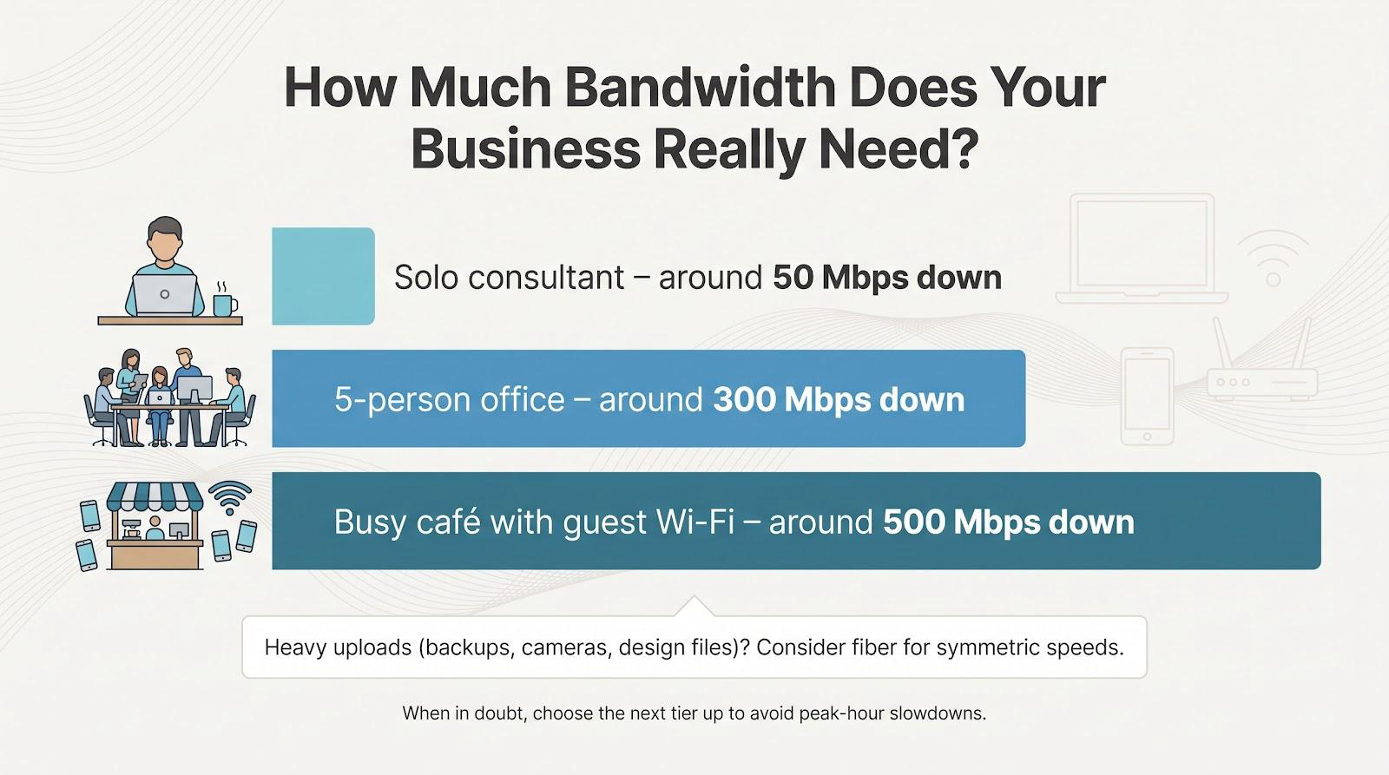
Uploads matter more than many owners expect. Cloud backup, security-camera feeds, and real-time design work all push data out. Cable uploads of 20–50 Mbps handle light duties, but creative shops sending gigabyte files sleep easier on the symmetric lanes of fiber.
If usage feels fuzzy, pull last month’s stats from your router or ISP portal. Peak traffic, not the average, is the choke point you want to avoid. When in doubt, pick one tier higher than today’s need. Extra headroom costs a few dollars; a frozen checkout line costs sales and reputation.
Leave room for growth. Hiring two more staffers next quarter? Launching curbside-pickup tablets for the holidays? Order bandwidth once, not twice. Your future self will thank you.
Hidden fees and contract “gotchas” to watch
ISPs sell speed but often profit from the fine print. Before you sign, flip through every page and flag line items that can balloon your bill six months in.
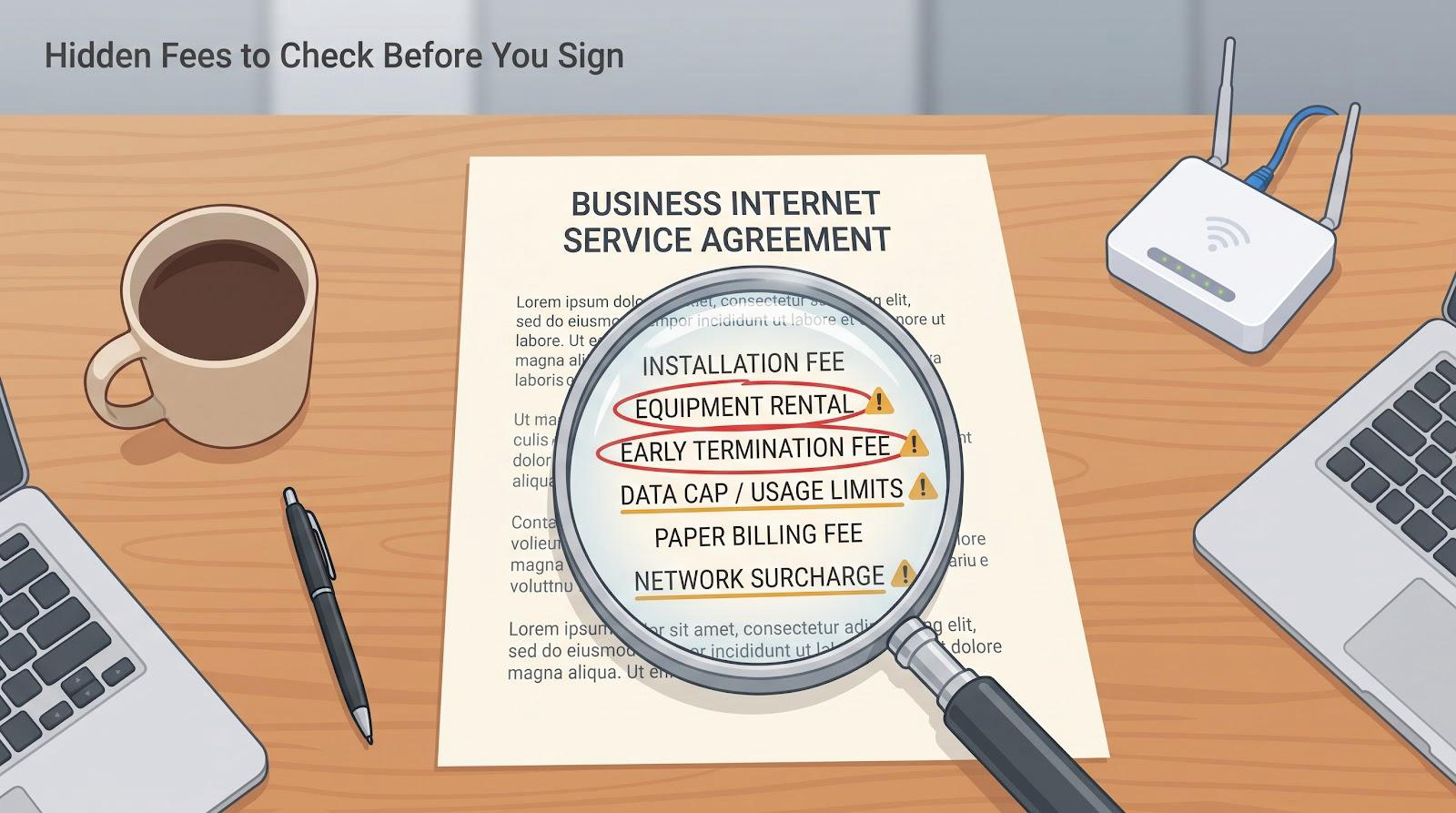
Installation fees hide in the shadows. “Free install” banners sometimes mask a rebate you must claim. Ask for the charge to be waived outright or credited on the first invoice.
Equipment rentals add up quickly. WOW loans the modem free for ninety days; then eleven to fifteen dollars tick on each month. Spectrum includes a modem but charges extra for its premium Wi-Fi. If the provider lets you supply your own hardware, do the math. Buying once can save hundreds across a two-year term.
Early termination clauses bite hard. Cable contracts often bill the full remaining months or a flat fifteen dollars per unused month. Confirm the penalty in writing, and calendar your renewal window so you can renegotiate before the clock resets.
Data caps lurk, especially with Mediacom. Sales reps love the word unlimited, but the terms of service may define “excessive” use and outline overage charges. Get that in writing before you sign; surprises here derail budgets fast.
Paper billing fees, late-payment “processing” charges, and network cost-recovery surcharges appear after the honeymoon. Scrutinize the first statement, and dispute anything that was not disclosed.
One last tip: record every promise. Send a follow-up email summarizing your sales call, and ask the rep to confirm. A documented thread is your best weapon if the future bill tells a different story.
Frequently asked questions
What is the single most reliable option in Columbus?
If AT&T Fiber is live at your address, choose it. Symmetric speeds and an uptime guarantee beat every coax or wireless alternative.
Can I keep my current email and phone bundles when I switch ISPs?
Yes. WOW, Spectrum, and Mediacom all sell stand-alone internet. You can port phone numbers to VoIP providers like RingCentral or keep your Gmail workspace unchanged.
Does 5G internet work inside metal buildings?
Signal struggles through dense walls. Test T-Mobile’s free trial before you cancel a wired line, or mount an external antenna to pull stronger tower reception.
Will Spectrum pay my early-termination fee?
Spectrum’s contract-buyout program covers up to 1,000 dollars once you submit the final bill from your old provider within 60 days of installation. Confirm the promo is active when you order.
How do I set up automatic failover?
Buy a dual-WAN router. Models from TP-Link, Ubiquiti, and Peplink start around 100 dollars. Plug your primary cable or fiber line into WAN1 and the 5G gateway into WAN2. Enable failover in the router menu and test by unplugging WAN1. The switch should happen in less than 30 seconds.
What speed tier should a café with guest Wi-Fi choose?
Aim for at least 300 Mbps down. That supports a dozen streaming phones plus your point-of-sale traffic without hiccups. Limit guest bandwidth per device in the router so customers do not hog the entire pipe.
Can I negotiate business pricing?
Absolutely. ISPs have retention teams with discount power once they know you are shopping. Gather two written quotes, call your preferred provider, and politely ask if they can match or beat the total cost.
Is Starlink an option for rural storefronts?
Starlink covers all of Muscogee County, but latency, weather sensitivity, and higher equipment costs make it a backup choice behind cable or 5G. Use it only when you have no terrestrial alternative.
Conclusion
Getting the right internet connection can mean the difference between a buzzing checkout line and frustrated customers. Use the rankings, tips, and hidden-fee checklist above to choose the provider that will keep your business – and its revenue – online.