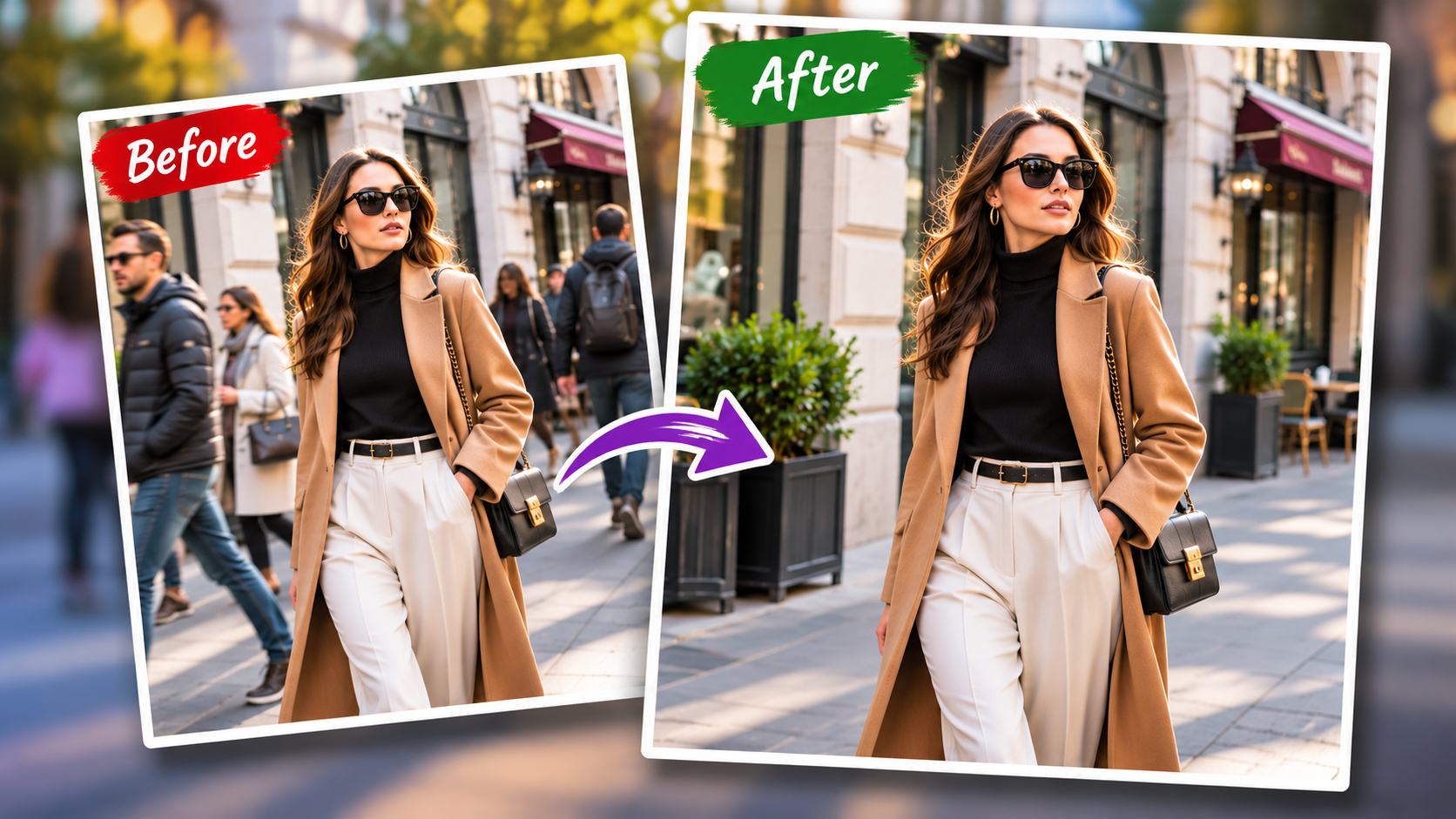
Street-style photography is all about energy, spontaneity and the real world. Photographs of models on cityscapes, busy sidewalks, storefronts, crosswalks, or a textured urban background can breathe new life into a fashion image. The trouble is, these places are seldom vacant. It can be a clean composition until pedestrians, cyclists, tourists, delivery personnel and parked vehicles make it distracting.
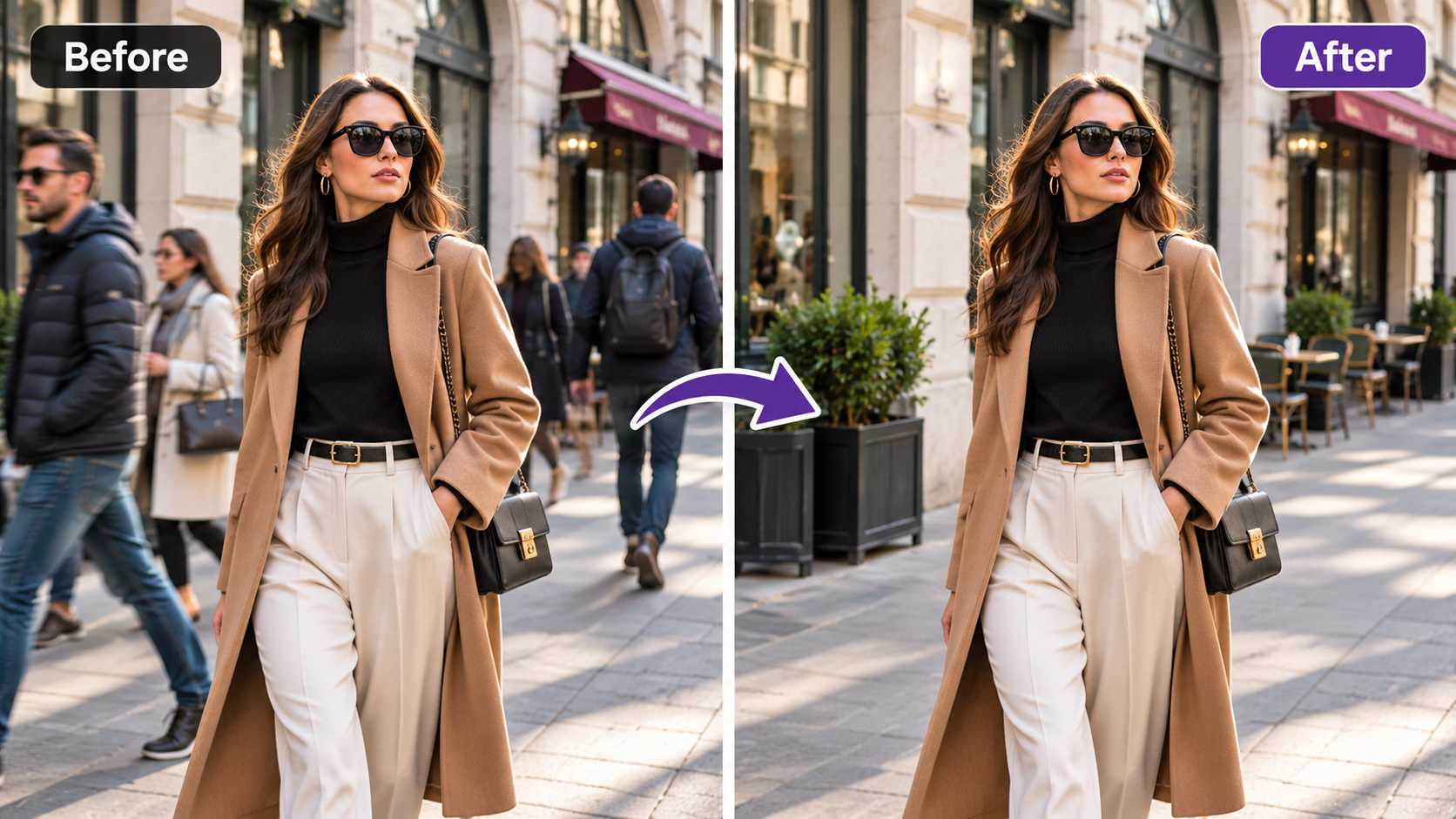
The task of getting rid of the unwanted human presence from a street style photograph or content has become a common practice for photographers, editors, content creators and fashion brands. This doesn’t have to be a fake or a no-person’s-land scene. Rather, it is good editing that captures the essence of the location and focuses the viewer’s attention on the subject and outfit, pose and styling.
Why Passers-By Can Weaken an Otherwise Strong Fashion Image
The environment adds personality to the photograph, that’s why street photography is so successful. A blank wall can give a simple outfit a better edge or a full city block, make an editorial look more lively. Backgrounds start to create issues when they are vying with the model for attention.
If you have an interesting fashion subject, the bright clothing on the passer-by can draw the eye away from the fashion. If someone is walking directly behind the model, he/she may create awkward overlaps around the model’s head, shoulders, or legs. An accidental appearance of a face at the edge of the frame can also make the composition look more accidental than intentional.
If the overall image is good, re-shooting might not be feasible. What might have looked like an ideal expression, pose, lighting and clothing for the model could have been completely in place in that particular shot. When this is the case, selective retouching can come in handy to avoid losing any important details of the original moment while keeping the picture visually clear.
Creators looking for a simple solution to remove person from photo might find automated object-removal features helpful for removing unwanted elements without compromising the main focus, the fashion itself. The best results are typically achieved by automating in conjunction with careful visual judgement, and not by relying on removal as an alternative to editing.
Clean Retouching Begins With Choosing the Right Frame
The first step after taking a photo is to consider an editing decision: Before taking anyone out of a photo, make sure the image is worth editing. This should be the correct expression, posture, styling and overall placement of the model. The best retouching is when it enhances a good photograph, not when it saves a photograph with multiple compositional issues.
An additional consideration is the location of unwanted people. A little more easily removed pedestrian is typically the one against a simple street or brick wall, rather than one standing directly behind the model. The more the background figure’s hair overlaps or covers hair, transparent cloth, accessories or patterned clothing, the more difficult the reconstruction process will be.
During the shoot, photographers can mitigate these issues by shooting multiple photos from the same angle. When there’s just one or two seconds of difference, it might give you cleaner background information to use later during editing.
Preserve Texture Instead of Creating Empty Patches
The greatest indicator of bad most people removal is generally not the loss of the individual. It is the broken background which remains.
Common repeating features in street-style environments are paving stones, windows, road markings, brickwork, railings, posters, shadows, and reflections. If someone is excised, the information must flow entirely through the area that has been cut. The viewer might spot the retouching if background elements are blurred, smeared or intriguingly smooth.
Good editors consider context in determining edits. The place of the sidewalk’s edge must continue in the right way. The shape of the frame should be straight. Shadows should correspond to the source of light. If the scene is overcleaned, so that all the things are removed correctly, it can look less realistic that the original scene, so all small imperfections should be kept.
Retain Natural Background Activity When Appropriate
Not all street-style photos have to be devoid of passers-by. Sometimes, it’s the off-camera presence of a couple of folks further away who can really make the picture seem more real.
It’s hierarchy, and the key.
The model should be the visual centre of interest. Minor figures or details in the background can provide context and not detract from the main subject. Eliminating just the individuals that pose a problem with the model can produce a more realistic look than eliminating all human figures in the scene.
This is particularly crucial for editorial fashion photography. If there is no element of emptiness in the creative concept, a completely empty city street can look unusual. Some natural movement in the distance helps to give the impression that the photo was taken on location.
Watch for Shadows, Reflections, and Secondary Evidence
A frequent editing error is to cut out a person when you leave behind clues that they were there. Their shadow can still be seen on the pavement. They can still be seen in a shop window. A bag, bicycle or partially visible limb may still be visible around the edges of the cropped view.
It’s important to look at the whole scene, not just the body of the person being retouched. Clean surfaces are of special interest, since locations in the city may contain glass windows, shiny cars, metal panels, and wet streets.
Shadows can also be a challenge. If a pedestrian had been removed and had cast a long shadow over the ground, the space left behind needs to be built to replicate the lights cast on the ground around the pedestrian.
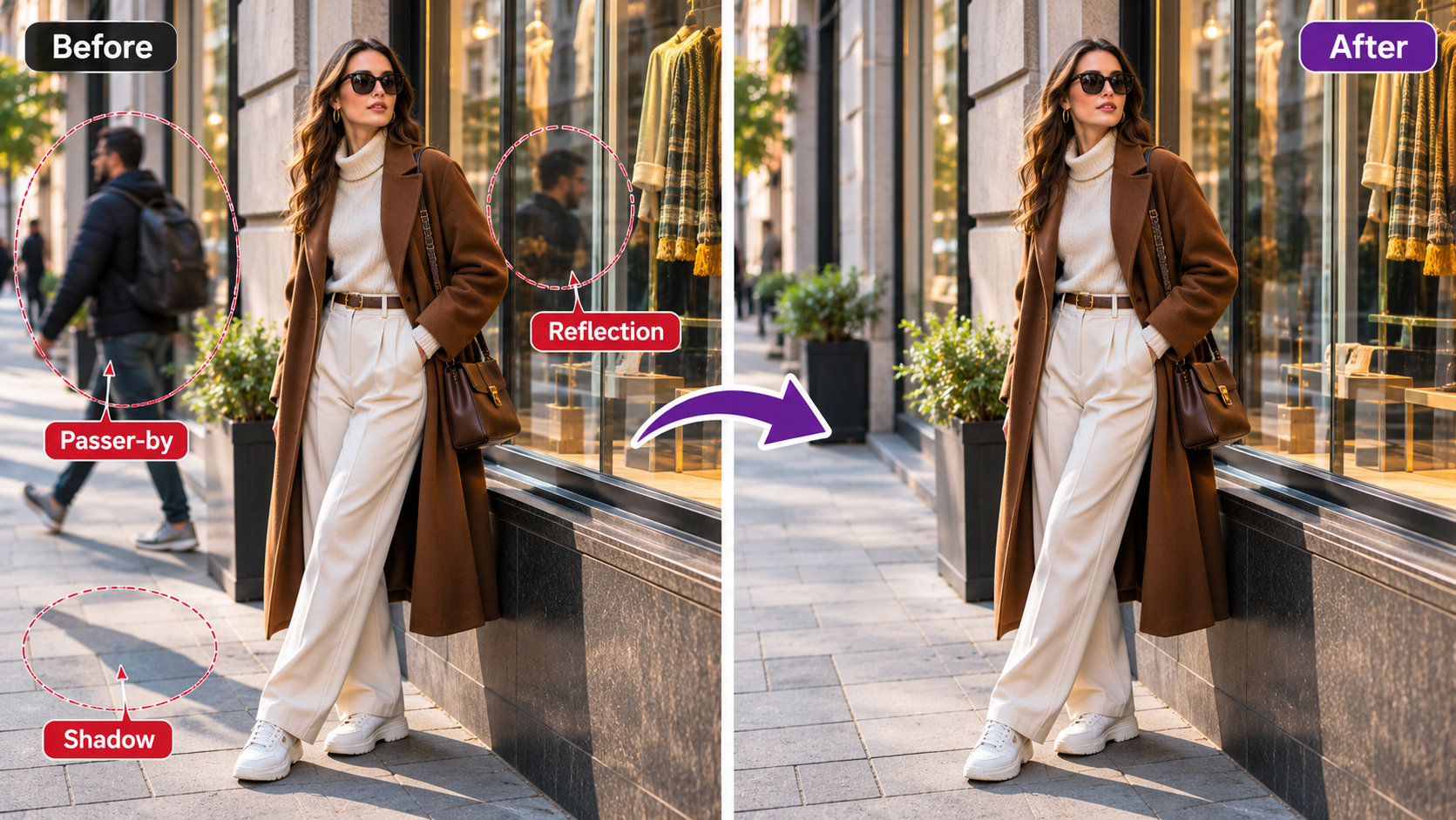
Protect the Model’s Clothing and Silhouette
The most important thing about fashion photography that is not important in typical travel or street photography, is that the clothing requires to stay accurate.
When a passer-by steps on the edge of a coat, dress, handbag, shoe or flowing fabric, aggressive removal may result in accidental alterations to the garment’s shape. Distortion is a potential problem with small subtle changes that could change the desired silhouette or make fabric edges look unnatural.
At high magnifications, editors should check around clothing. Some fine details like stitching, folds, fringe, lace, transparent material, and hair may need extra care. The idea is to eliminate the distraction without altering the fashion itself.
Especially for commercial photos, they might be used to represent a particular product. Do not make unnecessary changes to the design elements that the clients are supposed to see only as it is.
Color and Lighting Should Stay Consistent After Cleanup
Even if a background is properly reconstructed, variations in tone can show up where editing has taken place. A repaired section of pavement might be lighter in colour than the rest of the pavement or a wall may suddenly have no natural variation in colour.
Clear away passers-by and then look at the picture at normal viewing size, not zoomed in. Search for variations in brightness, contrast, texture and colour temperatures. The edited section should merge seamlessly with the rest of the image, and shouldn’t stand out from it.
Street scenes can have a mix of light sources: daylight, store signs, street lights, and reflected light. Keeping those subtle differences will create a more realistic final product.
Use Removal as Part of a Larger Fashion Editing Workflow
The street style removal is typically one part of the process to prepare a street-style image. Once the background is cleared, photographers can further tweak exposure, crop, enhance color, straighten perspective and make subtle changes to the skin or clothing.
These steps can be performed in any order. Large areas of background cleanup can sometimes be easier to do before strong color grading and heavy sharpening are applied. Having distractions eliminated gives the editor a clearer picture of the composition to make decisions about mood and tone on a global basis.
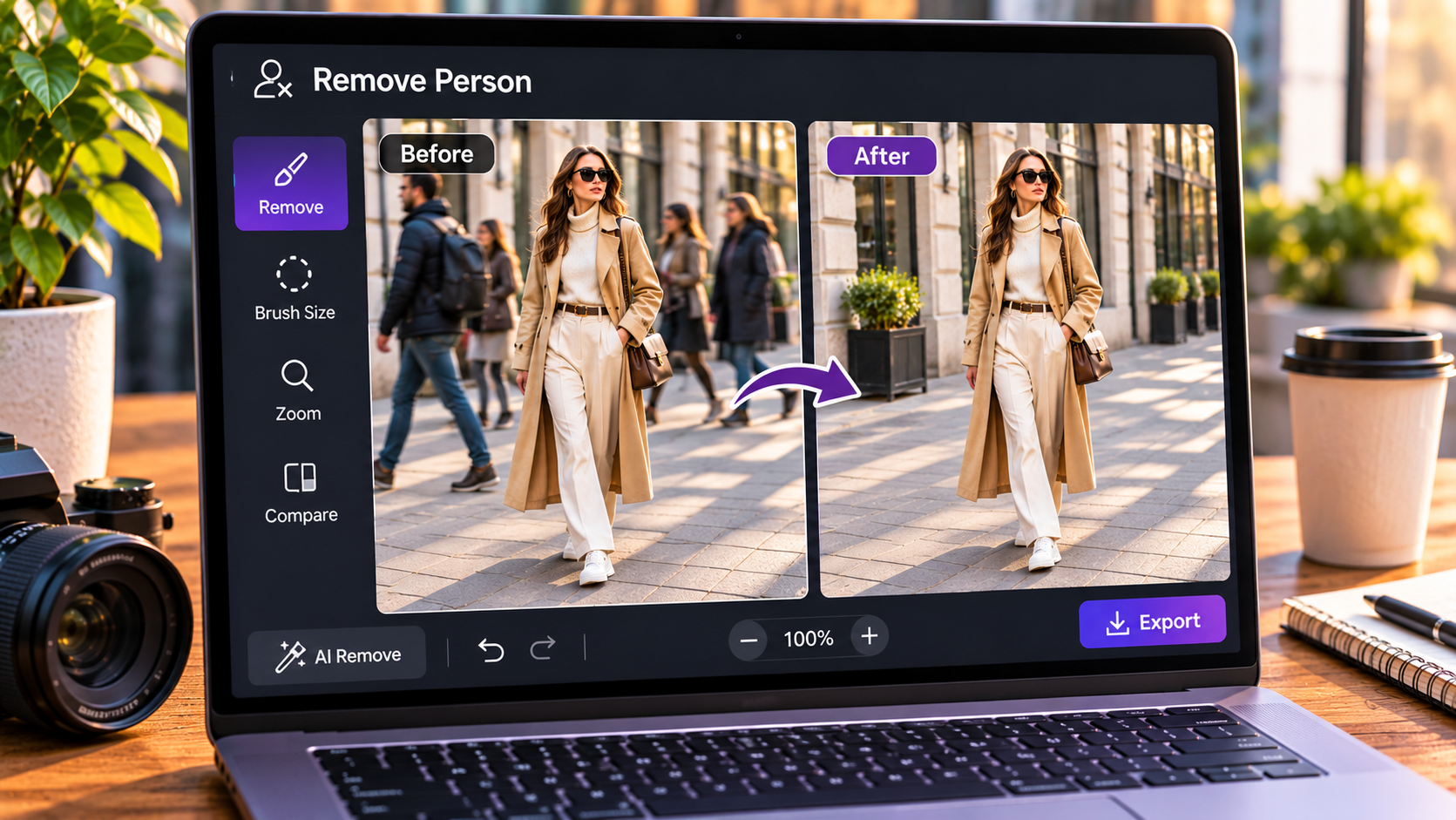
Final Checks Should Focus on Realism Rather Than Perfection
Retouching that is most successful is most invisible. When you are ready to export a final photo, check it out at various sizes. Any edges or textures should be zoomed in to see if they are sharp and natural or if they are warped; zoom out to see if the image overall looks natural.
As a viewer look at the picture. Does the model make for instant recognition? Is it still a real street in the background? Do there appear to be any repeated textures or unusual patterns where people have been cut out? Do shadows and reflections relate?
It can also serve as a brief respite prior to the last review. After a long time working on a certain field, editors might miss certain minor inconsistencies.
A Cleaner Street Scene Can Strengthen the Fashion Story
Street style photography is good when fashion and environment complement each other. Using urban locations brings character, scale and realism, but can detract from a good photo if there is too much background activity.
Having some passers-by removed lets photographers capture the spontaneity of the shoot, while at the same time finely tuning the visual focus. The best edits are those that honor the existing architecture, light, texture and ambiance instead of attempting to obliterate all traces of urban life.
Person removal, if executed properly, should not cause the viewer to consider editing. It should make the whole fashion subject more purposeful, more refined, more savable.