Fashion brands need more than a collection of beautiful photographs. A new collection might have a strong lookbook, carefully styled product shots, and professional campaign images, yet those assets can quickly become repetitive when shared across Instagram, Pinterest, TikTok, and an online store.
For independent designers, boutique owners, fashion marketers, and content creators, producing fresh video content for every campaign can be expensive. Another photoshoot means arranging models, styling, locations, lighting, and postproduction. But when good photography already exists, there may be a simpler way to create additional visual content.
An AI image to video generator free to try can help turn selected fashion photographs into short videos. With ImageToVid AI, you can upload an image, describe the movement you want, and generate a video based on the original visual. This gives fashion teams another way to present a collection without starting every project from scratch.
The key is knowing which images to animate, what movement suits the clothing, and how to review the result before publishing.
Why Fashion Creators Use an AI Image to Video Generator Free of Charge
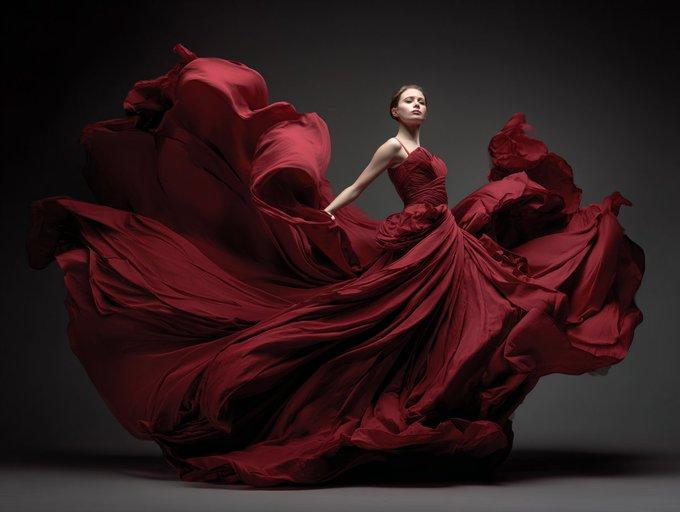
Fashion photography communicates styling, silhouette, color, and mood. Video can add another dimension by introducing movement to a scene. A flowing skirt, an oversized coat, or a model standing in soft afternoon light may feel different when the image comes to life.
For fashion brands, the value is not simply making a photograph move. It is creating content that serves a specific purpose.
A designer might animate an editorial image to give a collection launch a more cinematic feel. A boutique could turn a model photograph into a short social media clip. A fashion blogger might use subtle movement to make an outfit post more engaging without arranging another shoot.
This approach is especially useful when a brand has a limited production budget or a large library of existing images. Instead of treating every photograph as a single-use asset, the team can identify images that could work as short videos, campaign teasers, or alternative social posts.
ImageToVid AI provides a way to experiment with this process. Results depend on the source image, prompt, and selected model, so it is best to start with a clear creative objective rather than expecting every photograph to produce a polished video immediately.
What Fashion Content Works Best with an AI Image to Video Generator Free?
Not every fashion photograph needs animation. The strongest candidates are images where movement can reinforce the styling or atmosphere.
Fashion Lookbooks and Editorial Photography
Lookbooks often contain carefully composed images designed to communicate a collection’s overall aesthetic. A subtle camera push, gentle movement in the background, or a slight breeze through loose fabric can add variety without changing the original concept.
For editorial images, keep the movement restrained. The purpose is to preserve the mood, composition, and styling rather than introduce dramatic action that distracts from the clothes.
Clothing Campaigns and Seasonal Collections
A seasonal campaign may include several photographs featuring the same collection. Selected images can be adapted into short videos for launch announcements, collection previews, or social media posts.
For example, a summer collection might benefit from soft sunlight and natural movement, while an autumn campaign could use a slower camera approach and a more atmospheric setting. The creative direction should come from the collection itself, not from adding effects simply because they are available.
Accessories and Product Photography
Bags, shoes, sunglasses, and jewelry can work well with controlled camera motion. A gradual push toward a handbag can draw attention to its overall design, while a subtle orbit may create a more dimensional presentation.
However, product accuracy matters. AI generated motion may alter stitching, hardware, patterns, or proportions. For ecommerce listings, review every detail and avoid using generated footage to imply product features that have not been verified.
How to Use ImageToVid AI for Fashion Content
ImageToVid AI lets you use an existing image as the starting point for video generation. This workflow can suit a lookbook photograph, a styled portrait, or a fashion product image.
Step 1: Choose a Fashion Photograph
Start with a clear image that has a defined purpose. A full length portrait is useful for presenting an outfit, while a close up may be more suitable for accessories or fabric details.
Check that the garment is visible and that the composition leaves enough room for the movement you have in mind. Busy backgrounds, overlapping limbs, and complicated patterns can make the result less predictable.
Think about the final placement before you begin. A vertical image may suit a short form social post, while a horizontal image may be more appropriate for a website banner or campaign presentation.
Step 2: Upload Your Image to ImageToVid AI
Open ImageToVid AI and access the image to video tool. Upload the fashion photograph you want to animate.
Before generating, decide what the finished clip should communicate. Do you want to highlight the silhouette of a dress, create an editorial mood, or draw attention to an accessory? One clear objective makes it easier to write an effective prompt and judge the result.
Step 3: Write a Prompt That Understands Fashion
A useful prompt explains the movement, camera behavior, and details that should remain consistent. You do not need a long list of cinematic adjectives. Specific instructions are usually more useful than vague requests to make an image look professional.
Try these examples:
For an editorial lookbook
“Slow camera push toward the model, gentle movement in the coat fabric, natural studio lighting, preserve the original outfit and styling.”
For a summer dress campaign
“A light breeze moves the flowing skirt and loose hair, soft afternoon sunlight, subtle camera movement, maintain the dress color and silhouette.”
For a luxury handbag
“Gradual camera orbit around the handbag, controlled reflections on the leather, elegant studio lighting, preserve the bag’s shape, material, and hardware.”
For a streetwear outfit
“Subtle camera movement, the model shifts naturally into a relaxed pose, keep the urban background consistent, preserve the jacket graphics and clothing details.”
Each prompt focuses on a small number of changes. This is important when clothing details need to remain recognizable. Although instructions can guide the generation, they cannot guarantee that every seam, print, or accessory will remain identical.
Step 4: Select a Model and Generate
ImageToVid AI offers different video models and generation options. Available settings can vary by model, so check the controls shown in the tool before generating.
For fashion photography, begin with moderate movement. Excessive camera motion or complicated actions can make a garment look unnatural and distract from the styling.
If the first result does not meet your expectations, change one element at a time. Simplify the prompt, reduce the movement, or clarify which parts of the image should remain consistent. This makes it easier to understand what improves the result.
Step 5: Review the Video Before Publishing
Fashion content needs careful visual review. Watch the entire clip and inspect the garment’s shape, patterns, seams, buttons, jewelry, hands, and face.
Ask three questions:
- Does the clothing still resemble the original item?
- Does the movement support the intended style?
- Could the video give customers a misleading impression of the product?
If a pattern changes or an accessory becomes distorted, regenerate the clip or use the original photograph instead. For product pages, accuracy should take priority over visual effects.
Four Practical Ways to Use AI Video in Fashion
Extend a Lookbook Beyond the Photoshoot
A lookbook may contain dozens of images, but only a few may need animation. Choose photographs where movement can add atmosphere or help the viewer focus on the outfit.
A slow camera approach can create a more cinematic editorial clip. A gentle breeze can add movement to an outdoor portrait. Combining static images with short videos also creates variety across a collection page or social feed.
Create More Social Media Content from Existing Assets
Fashion teams often need multiple formats from one campaign: launch posts, outfit features, collection previews, and short videos. Animating selected photographs can help fill those needs without recreating the entire shoot.
A full outfit photograph might become a vertical clip, while a close up of a bag or pair of shoes could become a separate product focused post. The original images can still serve as carousel slides, website visuals, and lookbook pages.
This is useful for small brands that already have professional photography but limited time or budget for video production.
Test Campaign Concepts Before Investing More
Independent designers may want to explore different visual directions before committing to a larger campaign. An animated photograph can help test whether a slower editorial mood, a particular camera movement, or a more atmospheric background suits the collection.
These videos are useful for concept exploration and internal presentations. They should not be presented as proof of how a real garment moves or fits if the generated footage changes those details.
Give Accessory Photography More Depth
A carefully controlled camera movement can make an accessory image feel less static. A gradual push toward a handbag or a subtle movement around a pair of sunglasses can draw attention to the product.
Keep the effect simple and inspect the final clip closely. If AI generation changes the product’s dimensions, color, or construction, use verified photography for the details that matter to customers.
How to Get Better Results from Fashion Images
A few practical habits can improve the workflow.
Start with one objective. Decide whether the video should highlight the clothing, create an editorial atmosphere, or provide a new social media asset. Trying to achieve everything in one generation can make the prompt unnecessarily complicated.
Protect the garment details. Include instructions to preserve the original outfit, colors, and silhouette when those details matter. Treat these as guidance, not a guarantee.
Use motion selectively. Flowing fabric and loose hair may suit a light breeze effect. Tailored jackets, structured bags, and detailed jewelry often benefit from restrained movement.
Plan the format early. Consider where the video will appear before generating it. Cropping a full length outfit into a narrow frame may remove the very details the content is meant to show.
Review before publishing. AI generated footage can introduce visual inconsistencies. Check the final clip rather than assuming the first result is ready for a campaign or product listing.
Is an AI Image to Video Generator Free Enough for a Fashion Workflow?
A free AI image to video generator can be useful for testing ideas and making better use of existing fashion photography. The important question is whether it helps solve a real production problem: creating additional content without arranging a new shoot for every post.
ImageToVid AI is worth exploring if you want to animate lookbook images, experiment with campaign visuals, or create extra assets for social media. Start with one photograph and a simple prompt, then decide whether the result fits your brand’s visual standards.
Keep expectations realistic. AI generated videos can change clothing details, particularly intricate prints, accessories, and garment construction. They are best used with a review process, especially when the content represents products customers may purchase.
Make More of Your Existing Fashion Photography
A fashion photoshoot does not have to end when the final images are delivered. Selected photographs can continue to support lookbooks, campaign previews, social media posts, and creative concepts when adapted thoughtfully.
ImageToVid AI gives fashion creators a way to experiment with turning still photographs into short videos. Start with an image that already communicates the collection’s style, choose movement that supports the clothing, and check the generated result before publishing.
The goal is not to animate every image. It is to make better use of the photography you already have and give your audience another way to experience the collection.